Changing cost centre allocations for tasks and works
How to change the cost centre that a particular task or works item is linked to.
Introduction
All tasks that are listed in the maintenance tab and all works items on works orders are linked to a cost centre.
Cost centres for works are set at the line item level to allow different line items on a single works order to be linked to different cost centres if necessary.
When you change the cost centre for a task it affects which cost centre the task costs are set against - any future works items that are created will also be linked to the new cost centre. Any existing works items that have already been issued will not be affected.
When you change the cost centre for a works item it affects which cost centre the works item costs are set against.
Changing the cost centre for a scheduled task
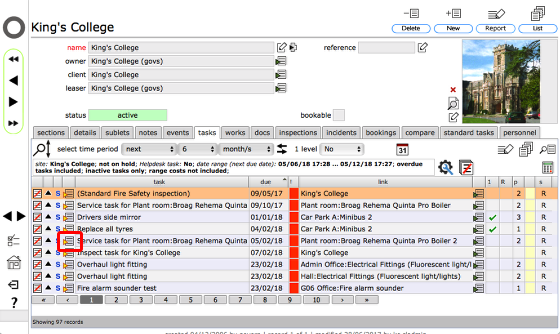
Start from the tasks tab list, or the full tasks list - goto the relevant task by clicking the Goto button to the left of the row.
Click the change cost centre button
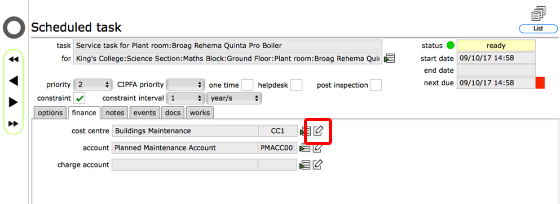
On the tasks record, click the finance tab.
Then click the edit button to change any of the cost centre, account or charge account.
Select new cost centre from list
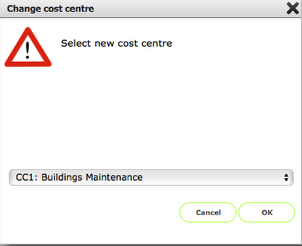
Click OK to confirm new cost centre (or account or charge account) allocation
Changing the cost centre for a works item
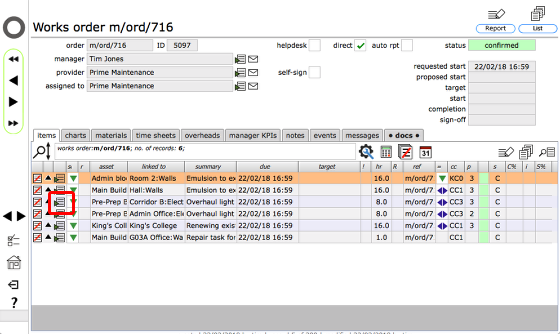
Start from the relevant works order. Click the Goto button for the relevant works item to go to the works item card.
Go to the works item costs tab
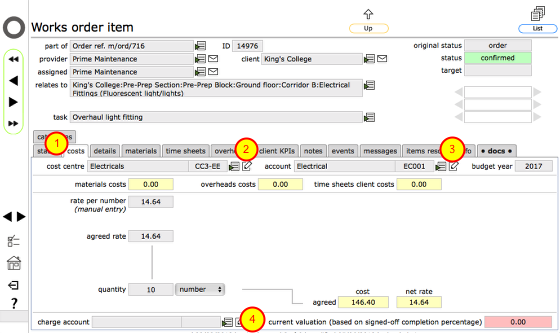
Click the costs tab (1), then click the change button next to the current cost centre allocation (2), or the account (3) or the charge account (4).
Select new cost centre from list
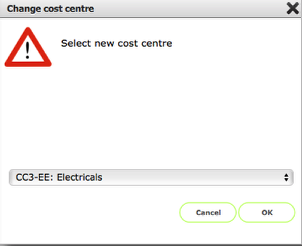
Click OK to confirm new cost centre allocation