Releasing a HOLD
How to release a Hold that has been applied to a Helpdesk issue, task or works order
The Helpdesk issue on HOLD
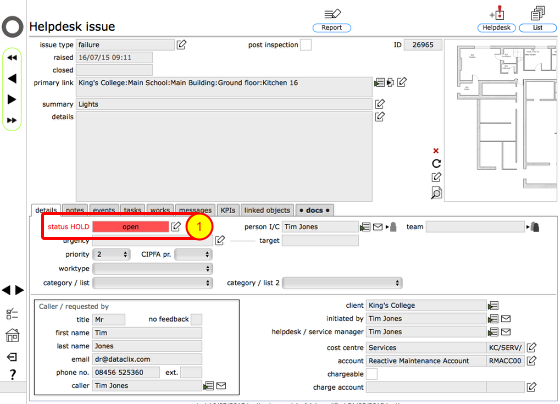
This issue has been placed on hold (the details of the hold and the notes that attach to it can be viewed by reviewing the hold event record which is listed on the events tab). Note the red status HOLD message and the red background colour of the status field. The status field itself confirms that the issue status was in progress when the hold was applied.
To release the hold, click the change status button next to the status field (1).
Issue on HOLD with linked works requiring PO number
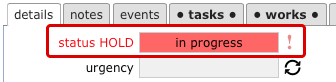
Where a works order has been created and it is waiting for a PO number to be supplied, the HOLD cannot be released in the normal way from the Helpdesk issue record. This will only be possible once the PO number has been supplied. The exclamation mark to the right of the status field confirms that a linked order is still waiting for a PO number.
Confirm release notes
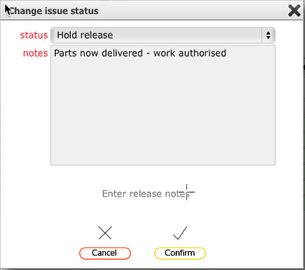
In the dialog, confirm the notes explaining the release of the hold and click Confirm
Helpdesk issue released
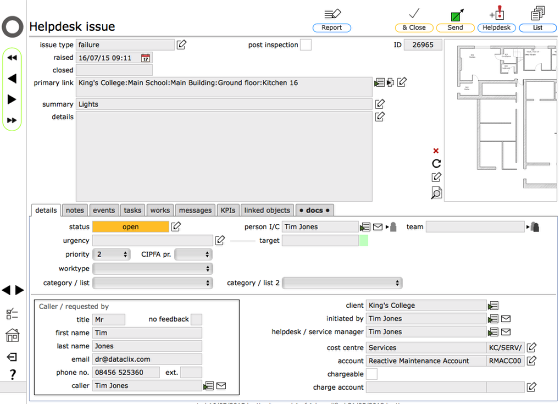
The issue has now been released and work can continue - any relevant personnel will by now have been notified by message, email and/or text that the hold has been released.
NOTE: As this issue has a related order, the order is also released from hold at the same time - in fact the hold can be released from either the helpdesk issue or the works order.
It is also possible to release a hold from the hodl event record itself - see the clesson on releasing a hold from a works order for further details